
Bridge vs. WATI
Connect the call agreement with the service that follows.
Compare Bridge and WATI for follow-up after a call. Check history and HubSpot or Zoho logging from web and mobile.
The case
The customer changes the installation date by phone. The team confirming delivery needs to find that agreement. WATI supports calls in its mobile app; its guide says automatic logging to HubSpot or Zoho requires a call from the web app. That condition does not mean the call disappears from WATI’s history.
Why choose Bridge
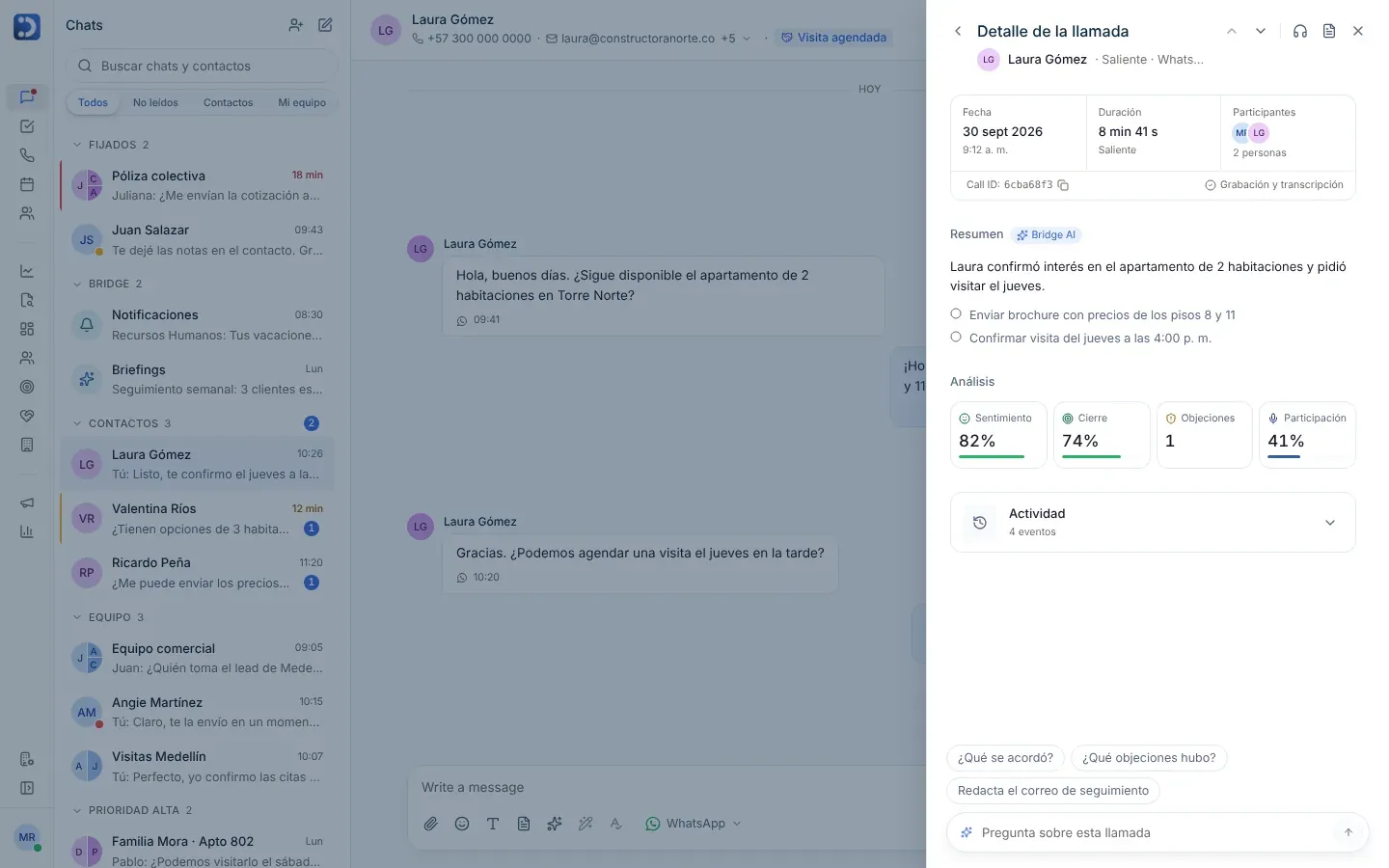
In Bridge, the team can review the recorded call, send confirmation by email and leave the next step for service.
If the implementation offers automatic stage actions, confirm their availability and setup before including them in the flow. CRM logging is checked separately for the call type and connector used.
Five steps in the same case
Each marker represents one step. Open the detail to see what each platform covers, which conditions apply and the source.
Symbol key
- In the product
- Requires configuration
- Through an integration
- Documented scope limitation
- Not documented
1Receive the date change on a WhatsApp call
Bridge
In the productWith the company number connected and calling configured, the app can receive WhatsApp calls.
- Bridge:
- In the product
WATI
Requires configurationWhatsApp Calling must be enabled on an account that meets WATI’s requirements.
- WATI:
- Requires configuration
2Email confirmation of the new date
Bridge
In the productThe email sent from Bridge stays in the customer history.
- Bridge:
- In the product
WATI
Not documentedThe channel overview does not establish native sending and logging of that email. Ask to see it.
- WATI:
- Not documented
3Give service the next action
Bridge
In the productTeams can leave a customer-linked task and coordinate who handles it.
- Bridge:
- In the product
WATI
In the productThe inbox lets the team assign the follow-up ticket to an operator.
- WATI:
- In the product
4Log a call in HubSpot or Zoho
Bridge
In the productWith the appropriate connector, calls can be associated with the contact, deal or both.
- Bridge:
- In the product
WATI
Through an integrationWith the CRM connected, the guide documents logging calls placed from WATI’s web app.
- WATI:
- Through an integration
5Repeat CRM logging from the mobile app
Bridge
In the productThe connector logs supported calls. Verify a mobile call using the device, call type and integration your team will use.
- Bridge:
- In the product
WATI
Documented scope limitationMobile app → HubSpot/ZohoWATI explicitly excludes calls made from its mobile app from HubSpot or Zoho call logging.
- WATI:
- Documented scope limitation
- Scope:
- Mobile app → HubSpot/Zoho
What this changes for your team
Service can follow up on the installation without asking the customer to explain the change again.
What to see in the meeting
Make one WhatsApp call from mobile and one from the web app in each product. Change the date, send confirmation and open the case as the service owner. Check the platform history separately from the HubSpot or Zoho record. Record the device, call type, connector and resulting activity.
How pricing works
Bridge
Application per user and AI agents per handled conversation; additional charges separate.
WATI
Plans with included capacities and messaging, user or extra-usage charges depending on the proposal.
Quote the same scenario: users, numbers, active customers, AI-agent activity, calls, messages, integrations, implementation and support. Billing units are not equivalent. Confirm currency, taxes, term and channel charges before comparing totals.
Buying question
WATI documents a web/mobile condition for logging to HubSpot or Zoho. Test the Bridge call from the device and connector your team will use as well.
Connect the call agreement with the service that follows.
In Bridge, the team can review the recorded call, send confirmation by email and leave the next step for service.
Book a meetingSecurity for your evaluation. In Bridge, configured rules flag conversations that may contain a risk. An authorized reviewer sees masked evidence and confirms or dismisses the case with a comment. View security · Trust Center (opens in a new tab)
Comparison method and scope
Prepared by Bridge using public documentation. Sources describe what each provider publishes; they do not replace a test of your setup. Compare the same case, plan, device and integration. Illustrative scenarios are not measured results or general limitations of another product. How to compare, in the guide