Bridge · The Relationship OS
How to choose an omnichannel platform for sales, operations and service
Compare the channels each platform connects, how it keeps the customer's history, and what information it can share with your CRM.
Bridge brings WhatsApp, calls, email and meetings into a shared history for sales, operations and service. Compare what the advisor receives after a lead is qualified, where the conversation continues and what the service team can review after the sale.
One delivery date, from first inquiry to renewal
Illustrative example
01First inquiry
A company asks for a quote on the company’s WhatsApp. LeadScout collects the requirements and hands them to the person preparing the proposal.
02Negotiation
On a call, the buyer moves delivery from the 15th to the 18th at the same price. The account manager emails the revised proposal.
03Delivery
The implementation lead opens the proposal the buyer received and confirms the 18th. They can verify the agreement while the account manager is in another meeting.
04After-sales service
The customer questions an invoice. Service looks up the agreed price in the same history and follows up on the request.
05Renewal or expansion
Months later, the new account manager reviews the terms and how the billing question was handled before discussing renewal.
What happens after a lead is qualified
After qualification, the team needs to continue the conversation, record the next step and preserve agreements for whoever serves the customer next. For implementations with internal pipelines enabled in Bridge, each company defines its stages and which people or AI agents can update them, with which permissions. If you need automatic actions or a CRM connection, validate availability, the connector, mappings and supported actions separately. Service and after-sales teams access the recorded history according to their permissions.
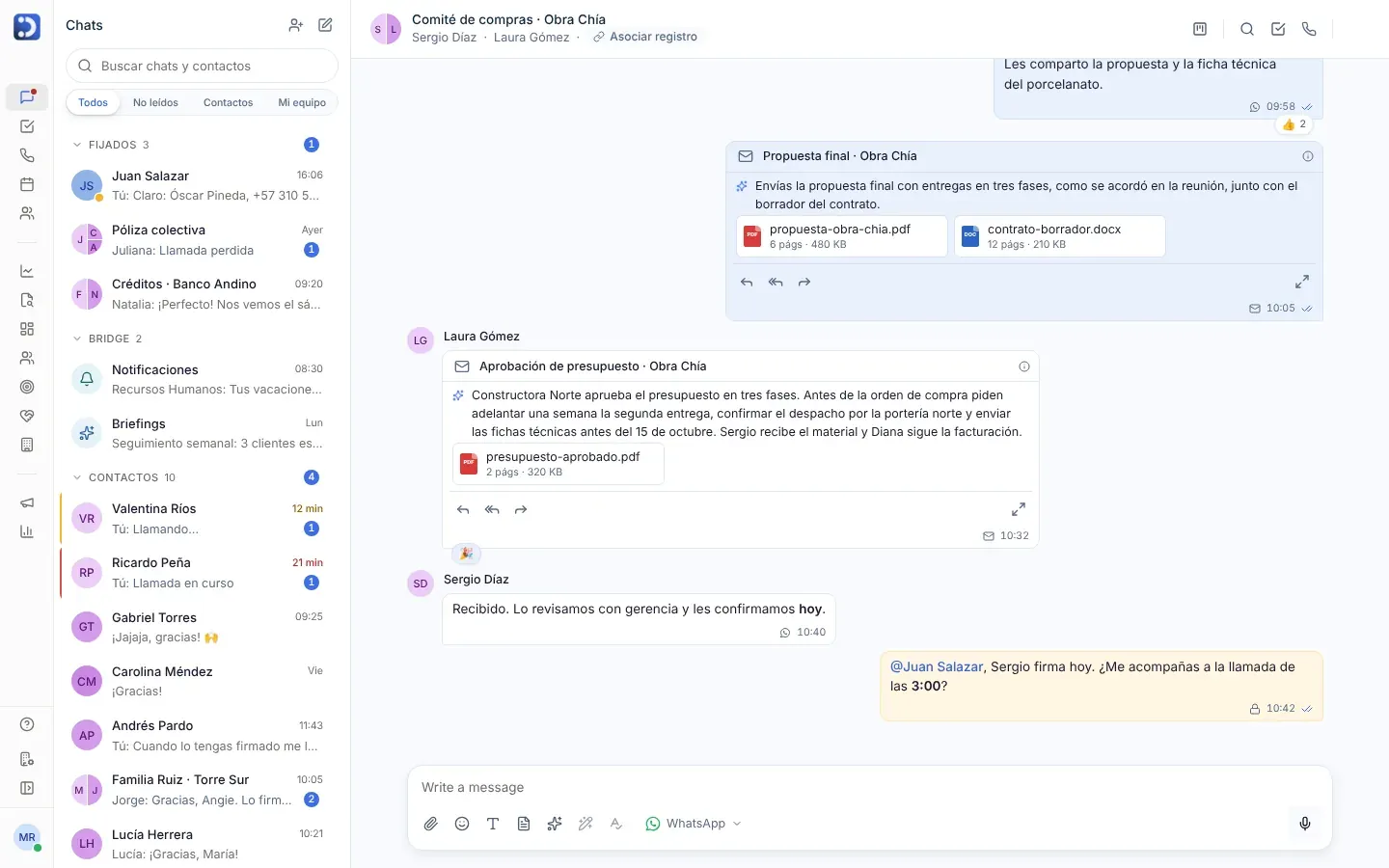
The proposal also matters to the person handling service
This conversation contains the proposal email and its attachments. When the customer calls about a delivery term, an authorized team member can open what the buyer received before replying.
What does your team need to resolve?
Sales and marketing
Find out what happened to the leads you paid for.
Check which leads reached the team and which are waiting for a reply. With a connected CRM you can link ads to recorded wins and decide where to spend.
Customer experience and service
Resolve a request without asking for the proposal again.
Service can retrieve earlier email, calls and commitments. When reviewing cost to serve, measure staff time on comparable cases and the number of times the customer has to get back in touch.
Security and compliance
Keep the account history when its owner changes.
Conversations on connected company channels remain available according to role. If a configured rule flags a risk, an authorized reviewer checks the masked evidence and documents a decision.
What Bridge shares with the CRM you already use
Review which parts of follow-up are managed in Bridge and which in the CRM. If the implementation includes internal pipelines, confirm your company-defined stages and their permissions. To share records and activities with a CRM, define the direction, mapping and actions supported by the connector. Using two tools does not mean entering everything twice; check the actual flow and manual work.
Which platform are you comparing with Bridge?
- Bridge vs. Atom
How the conversation continues after qualification and what another team member can retrieve.
- Bridge vs. WATI
How to retrieve a promise made on a service call.
- Bridge vs. respond.io
How to distinguish a renewal from an expansion on the same account.
- Bridge vs. Leadsales
Which customers wrote again and are still waiting for a reply.
- Bridge vs. SleekFlow
What a portfolio costs when clients return for service each month.
- Bridge vs. Kommo
How to keep HubSpot and reduce the activity your team has to re-enter.
- Bridge vs. Privyr
How a colleague takes over when the account owner is out.
- Bridge vs. Callbell
What the next team knows after a chat is handed over.
Comparison method and scope
Prepared by Bridge using public documentation. Sources describe what each provider publishes; they do not replace a test of your setup. Compare the same case, plan, device and integration. Illustrative scenarios are not measured results or general limitations of another product.
Symbol key
- In the product
- Requires configuration
- Through an integration
- Documented scope limitation
- Not documented
Buying questions
Do we have to connect a CRM to serve customers?
It depends on your operation and the functions enabled in the implementation. Confirm what your team can manage in Bridge and what requires a connected CRM. If the implementation includes internal pipelines, review your company-defined stages, permissions and configured actions. What is shared with the CRM depends on the connector.
How can we evaluate the impact on cost to serve?
Compare similar requests. Track staff time spent finding background and resolving the issue, and how often the customer has to contact you again. Include license and usage costs in the review.
What happens if the account changes hands?
The new owner can review the history from connected channels, available documents and recorded next steps, subject to their permissions.
What can service see when it receives a case?
Authorized team members can review the proposal, agreements and recorded conversations before continuing with the case.
What should I bring to a demo to compare platforms?
Bring one case that includes a lead, a proposal, a change of advisor and a service request. Ask each vendor to walk through the same steps.
Answers on other pages
Bring a customer request your team had to piece together
Choose a stalled sale, a delivery with special terms or a renewal handed to a new owner. We’ll trace the commitment, see who can retrieve it and check what reaches your CRM.
Book a meeting